Looking for a Bluehost coupon code? Here’s the most important thing to know before you buy.
At the time of writing, Bluehost’s best offer is deal-based, which means the discount is usually applied automatically during checkout. In most cases, you don’t need to enter a coupon code to receive the introductory pricing.
Current introductory offers include:
- Starter Plan from ₹199/month (36-month term)
- Save up to 43%
- Free domain for the first year
- Free SSL certificate
- Free CDN
- Managed WordPress updates
- 30-day money-back guarantee
If you visit Bluehost through a promotional page or affiliate link, the discounted price should already appear before you complete your purchase.
Bluehost Overview
| Company | Bluehost Inc. |
| Type | Web Hosting Provider |
| Official Website | bluehost.com |
Is There a Bluehost Coupon Code?
This is one of the most searched questions by people who are planning to buy web hosting.
The short answer is not usually.
Unlike some hosting companies that regularly publish promotional coupon codes, Bluehost often uses automatic promotional pricing. Instead of asking customers to copy and paste a code, the discount is applied directly to eligible plans.
This makes the buying process much simpler because you don’t have to worry about expired codes or promotions that no longer work.
Many websites still advertise “exclusive coupon codes,” but in most cases they simply redirect visitors to Bluehost’s current promotional pricing.
The most important thing isn’t whether you enter a coupon code. What matters is whether you’re receiving Bluehost’s best available introductory offer.
Current Bluehost Coupon Code & Deals
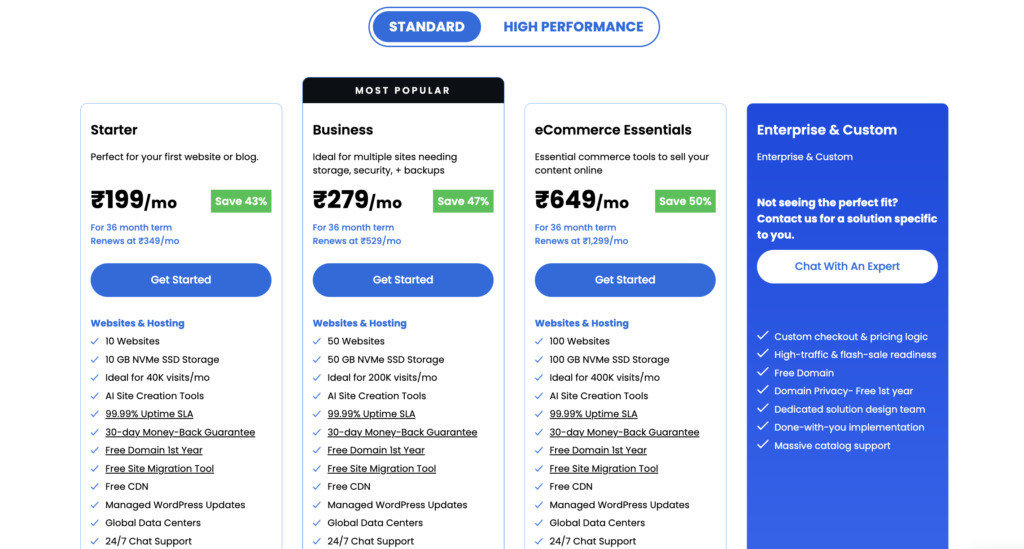
If you’re buying hosting today, these are the main promotional plans available.
Starter Plan
The Starter plan is designed for bloggers, freelancers, students, and anyone creating their first website.
Introductory Price
₹199 per month
Renewal Price
₹349 per month
Savings
Up to 43%
Included Features
- Host up to 10 websites
- 10 GB NVMe SSD storage
- Suitable for approximately 40,000 monthly visits
- Free domain for one year
- Free SSL certificate
- Free CDN
- Managed WordPress updates
- Weekly website backups
- AI website creation tools
- Global data centers
- WordPress staging
- SSH and WP-CLI
- 24/7 chat support
- 30-day money-back guarantee
For beginners, this plan includes almost everything required to launch a professional WordPress website.

Business Plan
If you manage multiple websites or expect higher traffic, the Business plan offers significantly more resources.
Introductory Price
₹279 per month
Renewal Price
₹529 per month
Savings
Up to 47%
Included Features
- Host up to 50 websites
- 50 GB NVMe SSD storage
- Suitable for around 200,000 monthly visits
- AI-powered malware detection and removal
- Domain privacy for the first year
- Free SSL
- Free CDN
- Weekly backups
- WordPress staging
- SSH and WP-CLI
- Managed WordPress updates
- 24/7 chat support
Compared with the Starter plan, Business offers more storage, stronger security, and enough resources for growing websites or small agencies.
eCommerce Essentials Plan
If your goal is to build an online store, Bluehost also offers an eCommerce-focused plan.
Introductory Price
₹649 per month
Savings
Up to 50%
This plan includes features designed for WooCommerce websites, making it a better choice for businesses selling physical or digital products.
Why So Many Beginners Choose Bluehost
Launching a website for the first time can feel overwhelming.
You need to register a domain, choose hosting, install WordPress, secure your website, and make sure everything works correctly.
Bluehost simplifies many of these steps by including several essential services with your hosting plan.
For example, the free domain means you don’t need to buy your website address separately during your first year.
The free SSL certificate helps protect visitor data and enables HTTPS without additional setup.
Managed WordPress updates reduce maintenance work, while the free CDN helps your website load faster for visitors in different locations.
Instead of piecing together multiple services from different companies, beginners can start with a single platform and expand later as their website grows.
How Much Can You Save?
Many people focus only on the monthly hosting price.
A better approach is to calculate the total value of everything included.
For example, with the Starter plan you receive:
- Introductory hosting price
- Free domain for one year
- Free SSL certificate
- Free CDN
- Weekly backups
- Managed WordPress updates
If you purchased these services individually from different providers, your total cost would usually be much higher.
That is why the introductory Bluehost offer can represent good value, especially for new website owners who want a simple all-in-one solution.
(Add screenshot here: Bluehost checkout page showing promotional pricing)
Reason: Shows readers that the promotional price is applied automatically.
Who Should Buy Bluehost?
Bluehost isn’t the perfect hosting provider for everyone, but it is a strong choice for many users.
Bloggers
If you’re starting a personal or niche blog, Bluehost provides enough performance and features to help you launch quickly without dealing with complicated server management.
Students
Students creating portfolios, resumes, or project websites often don’t need expensive cloud infrastructure. Bluehost offers an affordable way to build a professional online presence.
Small Businesses
Many local businesses simply need a fast, secure website with service pages, contact forms, and a blog. Bluehost includes the essentials without requiring advanced technical skills.
Freelancers
Writers, designers, photographers, developers, and consultants can use Bluehost to create a professional website that showcases their work and attracts new clients.
First-Time WordPress Users
One of Bluehost’s biggest strengths is its beginner-friendly setup process.
Instead of configuring a server manually, you can install WordPress, choose a theme, and start publishing content in a relatively short time.
Bluehost Features Explained
When people compare hosting companies, they often look only at storage size or monthly price.
Those numbers are important, but they don’t tell the whole story.
A good hosting provider should also make website management easier, improve security, and provide room for your website to grow.
Let’s look at the main features included with Bluehost and why they matter.
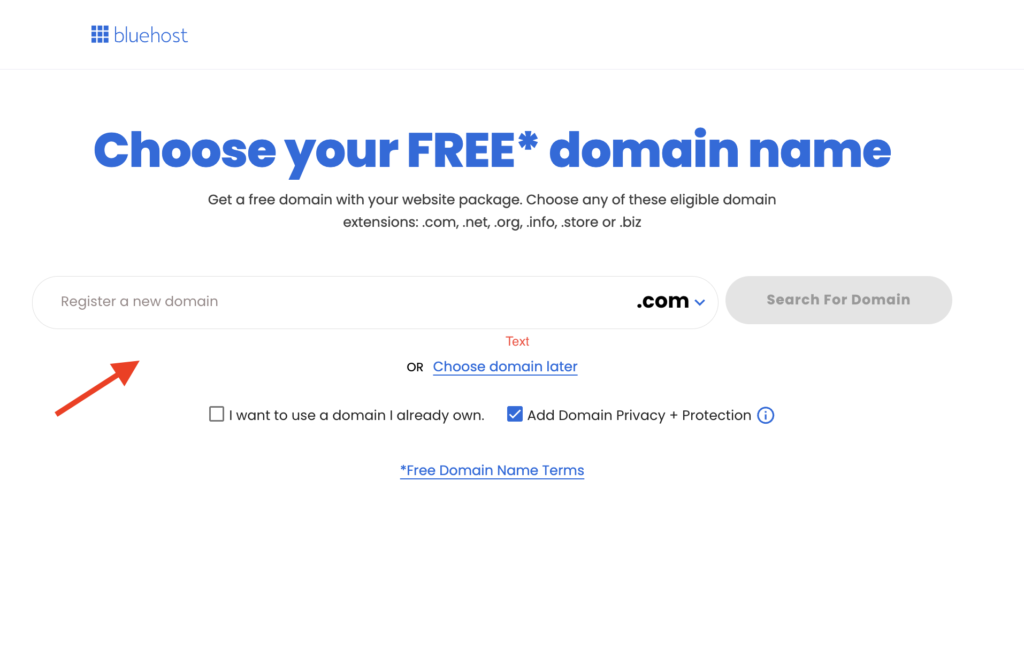
Free Domain for the First Year
Buying a domain name separately increases your startup costs.
With eligible Bluehost plans, you receive a free domain registration for the first year.
This makes launching a website much easier because you can manage both your hosting and domain from one account.
For beginners, it also reduces the number of services they need to learn.
Free SSL Certificate
Every professional website should use HTTPS.
Bluehost includes a free Let’s Encrypt SSL certificate with eligible plans.
An SSL certificate helps:
- Encrypt visitor data
- Improve website security
- Increase user trust
- Avoid browser security warnings
For most new websites, the included SSL certificate is more than enough.
Free CDN
Website speed affects user experience.
Visitors expect pages to load quickly, especially on mobile devices.
Bluehost includes a free Content Delivery Network (CDN) that stores copies of your website in multiple locations around the world.
This allows visitors to download website files from a server closer to them, reducing loading times.
AI Website Creation Tools
If you’ve never built a website before, Bluehost’s AI-powered website creation tools can help you get started.
Instead of beginning with a completely blank website, the AI asks a few questions and generates a basic layout that you can customize.
While experienced users may prefer building everything manually, beginners often appreciate the faster starting point.
Managed WordPress Updates
Keeping WordPress updated is important for both security and performance.
Bluehost includes managed WordPress updates, helping ensure your website stays up to date with the latest versions.
This reduces maintenance work and lowers the risk of running outdated software.
Weekly Website Backups
Mistakes happen.
Plugins can fail.
Updates can cause problems.
Having regular backups makes it much easier to restore your website if something goes wrong.
Weekly backups provide an additional layer of protection, especially for beginners who may not yet have a separate backup solution.
Bluehost Pros and Cons
Every hosting provider has strengths and weaknesses.
Choosing the right host means understanding both.
Bluehost Pros
Beginner-Friendly Dashboard
Bluehost is designed for users who are launching their first website.
The dashboard is clean, easy to navigate, and guides users through the setup process.
Affordable Introductory Pricing
The promotional pricing makes Bluehost accessible for new website owners who want to keep startup costs low.
Free Domain Included
Receiving a free domain during the first year reduces the overall cost of launching a website.
WordPress Integration
Bluehost is built with WordPress users in mind.
Installing WordPress is simple, and ongoing management is straightforward.
24/7 Customer Support
Help is available through live chat whenever you need assistance.
Money-Back Guarantee
The 30-day refund policy allows new users to try the service with less financial risk.
Bluehost Cons
Higher Renewal Prices
Like many hosting companies, Bluehost offers attractive introductory pricing but renews at a higher monthly rate.
Always consider the long-term renewal cost before purchasing.
Limited Resources on Entry Plans
The Starter plan is designed for new websites.
As traffic grows, upgrading to a higher plan may become necessary.
No Traditional Coupon Codes
Many users search for coupon codes even though Bluehost usually applies discounts automatically.
This can sometimes create confusion.
Bluehost vs Hostinger
Bluehost and Hostinger are both popular choices for beginners.
However, they serve slightly different audiences.
Pricing
Hostinger generally offers lower introductory pricing.
Bluehost includes additional services such as a free domain and strong WordPress integration.
Ease of Use
Both platforms are beginner friendly.
Bluehost focuses heavily on WordPress users.
Hostinger offers a modern custom control panel that many users also find easy to navigate.
Performance
Both providers deliver solid performance for new websites.
As websites become larger or receive significantly more traffic, users may eventually consider upgrading to cloud hosting solutions.
Support
Both Bluehost and Hostinger provide 24/7 customer support through live chat.
Which One Should You Choose?
Choose Bluehost if:
- You want a free domain.
- You are creating your first WordPress website.
- You prefer a hosting company with strong WordPress focus.
Choose Hostinger if:
- Budget is your highest priority.
- You need affordable hosting for multiple small websites.
Check Hostinger Latest Coupons & Discounts
Bluehost vs Cloudways
Some readers compare Bluehost with managed cloud hosting providers like Cloudways.
Although both host WordPress websites, they target different users.
Bluehost
Best for:
- Beginners
- Bloggers
- Students
- Freelancers
- Small business websites
Advantages:
- Lower introductory pricing
- Easy setup
- Free domain
- Beginner-friendly dashboard
Cloudways
Best for:
- Growing businesses
- High-traffic blogs
- WooCommerce stores
- Agencies
Advantages:
- Better scalability
- Dedicated cloud infrastructure
- Advanced performance features
- Greater flexibility
If you’re launching your first website, Bluehost is usually easier to manage.
Check Cloudways Discount & Deals
If your website becomes a business generating significant traffic or revenue, Cloudways may become a better long-term choice.
Frequently Asked Questions
Does Bluehost require a coupon code?
Usually, no. most bluehost promotions are applied automatically during checkout. If you see the discounted price before paying, there is generally no need to enter a coupon code.
Does Bluehost include a free domain?
Yes. eligible hosting plans include a free domain registration for the first year.
Is Bluehost good for WordPress?
Yes. bluehost is designed with WordPress users in mind and includes features such as managed updates, staging, and beginner-friendly setup tools.
Is Bluehost good for beginners?
Absolutely. bluehost remains one of the easiest hosting providers for people creating their first website.
Can I upgrade later?
Yes. as your website grows, bluehost allows you to upgrade to more powerful hosting plans.
Final Verdict
Bluehost continues to be one of the easiest ways to launch a WordPress website.
Its introductory deal provides good value by combining affordable hosting with useful extras such as a free domain, free SSL certificate, free CDN, managed WordPress updates, and a money-back guarantee.
The biggest advantage is simplicity.
Instead of managing multiple services from different providers, new website owners can start with one platform and focus on creating content or growing their business.
That doesn’t mean Bluehost is the perfect choice for everyone.
Websites expecting very high traffic or requiring advanced cloud infrastructure may eventually outgrow shared hosting and benefit from platforms such as managed cloud hosting.
However, for beginners, bloggers, freelancers, students, and small business owners, Bluehost remains a strong option.
If the current promotional pricing is available when you visit the checkout page, it represents a good opportunity to start your website while reducing your initial costs.